7 Steps to Choose an Ergonomic Office Chair for Back and Arm Support

Last Updated: November 14, 2026
Quick Summary
To choose an ergonomic office chair for back and arm support, measure your popliteal height, buttock-to-knee length and seated elbow height first, then match seat height, depth and width to those numbers. Set the lumbar pad to your belt line and adjust armrest height, width and depth so forearms rest level with the desk.
- Seat depth should leave a gap of about two to three fingers behind your knees.
- Seat width needs roughly 2 to 5 cm of clearance on each side of your hips.
- Most gas lifts cover roughly 40 to 52 cm, suiting a wide span of body sizes.
- Adjustable lumbar height matters more than lumbar depth for most people.
- Set armrest height so forearms rest level with the desk, elbows at roughly 90 degrees.
Table of Contents
- Start With Your Body Dimensions, Not the Chair Spec Sheet
- The Three Measurements That Decide Chair Fit
- How to Choose an Office Chair for Home: A Room-by-Room Fit Check
- Adjustable Seat Height, Seat Depth and Foot Placement
- Finding the Best Office Chair for Lumbar Support
- Adjustable Office Chair Armrests: Height, Width and Depth
- Recline, Tilt and Movement: What to Test Before You Buy
- The Best Ergonomic Office Chair for Long Hours: Comfort, Materials and Durability
- Try the Chair in Person or Use the Return Period
- Frequently Asked Questions
Start With Your Body Dimensions, Not the Chair Spec Sheet
Most people buy an ergonomic office chair like a jacket online: pick a size that sounds right and hope.
Desk workers often describe hand, wrist and forearm tension, and that discomfort is commonly linked to a workstation that holds the body in a fixed, awkward position for hours.
Before you read a single spec sheet, measure these:
- Popliteal height: floor to the crease behind your knee, shoes on.
- Buttock-to-knee length: from the back of your hip to the back of your knee.
- Elbow height, seated: floor to the underside of your elbow when your shoulders are relaxed.
Write the numbers down. Every adjustment below is judged against them, not against the marketing copy.
The Three Measurements That Decide Chair Fit
Seat height should let your feet rest flat while your knees sit near a right angle.
Seat depth should leave a gap of about two to three fingers behind your knees. Too deep and the cushion edge presses into the back of your legs, cutting circulation and pushing you forward. Too shallow and your thighs take the load instead of the seat.
Seat width needs roughly 2 to 5 cm of clearance on each side of your hips. A seat that feels snug at first will feel like a clamp by hour three.
Three measurements decide whether a chair fits, and each has a simple target to check against.
| Measurement | What to aim for | What goes wrong otherwise |
|---|---|---|
| Seat height | Feet flat, knees near a right angle | Feet dangle if higher; knees ride above hips if lower |
| Seat depth | Gap of about two to three fingers behind the knees | Too deep presses legs and pushes you forward; too shallow loads thighs |
| Seat width | Roughly 2 to 5 cm clearance on each side of hips | A snug seat feels like a clamp by hour three |
How to Choose an Office Chair for Home: A Room-by-Room Fit Check
Home offices break the rules office furniture reps assume: desks are often fixed-height, floors are uneven, and the chair has to double as dining-room seating when guests arrive.
Walk through your space before you shop:
- Measure your desk height first. If the desk is fixed and too high, you need a chair that rises to meet it plus a footrest, not a chair that fits you perfectly and leaves your wrists angled up at the keyboard.
- Check the floor surface. Casters behave differently on carpet than on hardwood. Hard floors need softer, quieter wheels.
- Measure the doorway and stairwell. A chair that won't fit through the door is a chair you'll return.
For a deeper look at desk-level tension, our guide to hand, wrist and arm tension solutions for home and office covers the habits that sit alongside chair choice.
Adjustable Seat Height, Seat Depth and Foot Placement
Set height first. Sit down, plant both feet flat, and raise or lower the seat until your knees are level with or slightly below your hips.
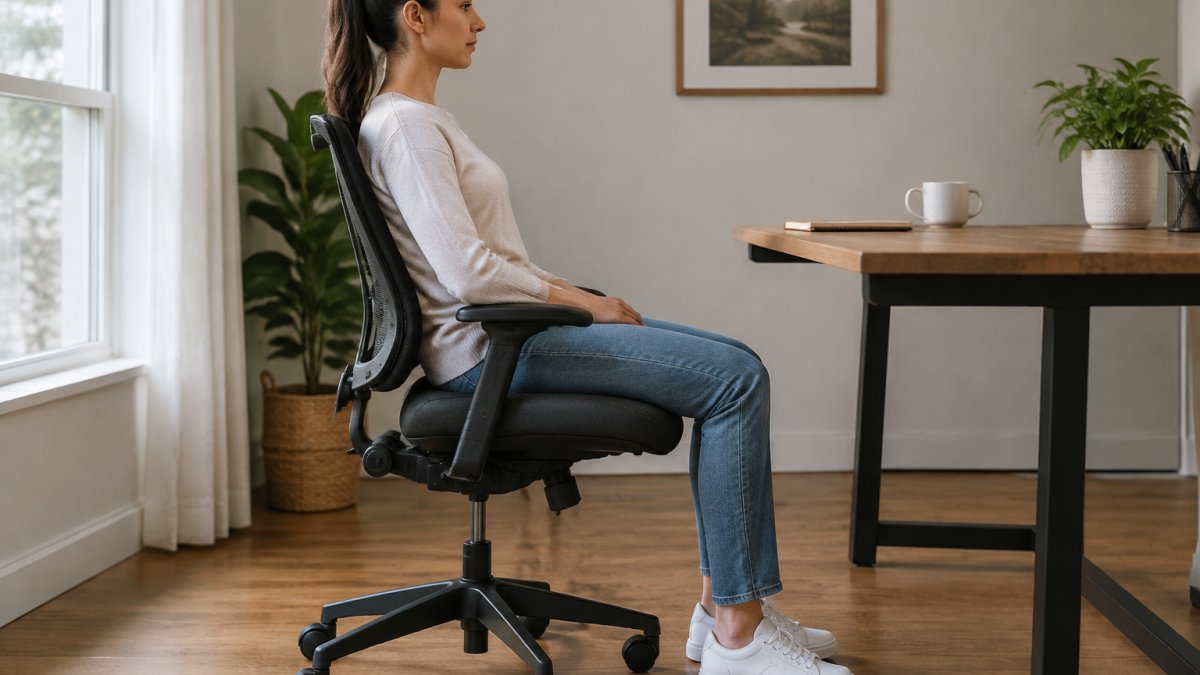
Then set depth. Slide the seat pan until you can fit two to three fingers between the cushion edge and the back of your knee.
Finally, check foot placement. Feet should be flat, not crossed, not hooked around the chair base.
The Gap Behind the Knees Test
Sit back fully against the backrest. Slide your hand behind your knee. If your fingers touch the cushion edge, the seat is too deep. If there's a hand's width of empty space, it's too shallow. Two to three fingers is the target.
This single test catches more fit problems than any other check, and it takes five seconds.
Finding the Best Office Chair for Lumbar Support
The best office chair for lumbar support is one where the curve of the backrest meets the curve of your lower back without a gap and without pressure.
Here's how to judge it:
- Sit fully back. Your lower back should feel contact, not air.
- Slide your hand between your lower back and the backrest. A flat palm should fit with light pressure, not slide in freely.
- Adjust the lumbar pad until the firmest point sits at your belt line, not above it.
- Hold for a minute. A hard edge digging in means the pad is too aggressive or too high.
Adjustable lumbar height matters more than lumbar depth for most people. A fixed lumbar bump in the wrong spot is worse than no bump, because it pushes your pelvis forward and rounds the upper back.
A Repeatable Lumbar Fit Check for Different Body Dimensions
General fit advice assumes an average torso. If your torso is short, long, or your pelvis tilts differently from the chair designer's model, use this sequence:
- Short torso: The pad often sits too high and presses the mid-back. Lower it as far as it goes. If it still lands above your belt line, choose a chair with a shallower fixed curve or a height-adjustable pad with a wider range.
- Long torso: The pad often sits too low and leaves a gap under the ribs. Raise it until the firmest point meets your belt line, and check the top of the backrest still reaches your shoulder blades.
- Forward-tilted pelvis: You'll feel pressure at the base of the spine rather than support along the lower back. Try a few degrees of forward seat tilt first; if the pad still digs in, the lumbar depth is too aggressive for your posture.
Watch out: if you fix a lumbar gap by adding a thick cushion, you shorten the effective seat depth and may lose the two-to-three-finger gap behind your knees. Recheck seat depth after any lumbar change.
What to Do When the Lumbar Curve Lands Wrong
If the pad sits in the right place but feels too firm, check the backrest recline before swapping chairs, a slightly reclined backrest spreads pressure across a wider area. If the pad is in the wrong place and cannot be moved, the chair is the wrong shape for your torso, and no cushion fully corrects it.
Adjustable Office Chair Armrests: Height, Width and Depth
Adjustable office chair armrests are the most underrated feature on the chair and the one most often left in the factory position.
Work through the four adjustments in this order, because each one changes the others:
Height. Set armrest height so your forearms rest level with the desk surface, elbows at roughly 90 degrees. Quick check: rest your hands on the desk and let your arms go slack. If your elbows lift off the armrest, it's too high; if your shoulders round forward to reach it, it's too low.
Width. Set width so your elbows sit close to your sides, not flared out. Most armrests adjust inward by a few centimetres; use that range.
Depth. Set depth so the armrest supports the forearm near the elbow, not the wrist.
Pivot and angle. Many armrests rotate or tilt.
When to Remove or Fold Armrests Away
Armrests are not mandatory.
Watch out: armrests that are set too high push your shoulders up toward your ears and round your upper back, which quietly undoes the lumbar contact you set earlier.
If you're fine-tuning this alongside wrist position at the desk, our guide on how to choose a wrist support for computer work pairs well with armrest setup.
How Back and Arm Support Work Together
Back and arm support are a single system, not two features.
Set the backrest first, then the armrests, then recheck the backrest. If adjusting the arms moved your lower back off the pad, the arms are wrong, not the back. For a new chair: set seat height, seat depth, lumbar height, armrest height and width, then confirm you still feel lumbar contact.
Recline, Tilt and Movement: What to Test Before You Buy
A chair that locks you in one position all day is not ergonomic, whatever the label says. Your spine wants to change angle through the day.
Test three things in the showroom or during your return window:
- Recline range. Lean back. The chair should follow you with resistance, not flop. A good recline keeps your feet planted and your hips at the same angle to the seat.
- Tilt tension. Adjust it until you can lean back with light effort and return upright without pushing.
- Seat tilt or forward tilt. A few degrees of forward tilt helps when you're working actively at the keyboard; a slight backward tilt suits reading and calls.
Lock the recline at least part of the day if you catch yourself slouching into the fully reclined position while typing. Movement is good; collapse is not.
The Best Ergonomic Office Chair for Long Hours: Comfort, Materials and Durability
The best ergonomic office chair for long hours is the one you can sit in for six hours without noticing it. That comes down to three things: padding that doesn't bottom out, materials that breathe, and construction that holds its shape.
Look for:
- Seat foam density. Soft foam feels great for twenty minutes and flattens by month six. Firmer, denser foam distributes weight better over a long day.
- Breathable mesh or woven back. Mesh keeps air moving across your back, which matters more than most buyers expect in a warm room.
- Commercial-grade construction. A chair rated for eight or more hours of daily use will outlast a lighter-duty model. Check the mechanism, the gas lift and the base, not just the upholstery.
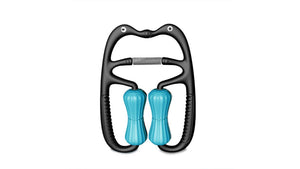
Long desk sessions also load the forearms and hands, not just the back. The Roleo arm and hand massager is built for exactly that kind of short, targeted session, and our guide on how to use it at your desk walks through placement so the device sits at elbow height beside your keyboard.
Try the Chair in Person or Use the Return Period
Buying blind is the biggest risk in chair shopping. Two chairs with identical specs can feel completely different after an hour.
If you can sit in one first, spend at least fifteen minutes in it, not two. Adjust everything. Type on a laptop at desk height.
If you buy online, treat the return window as your trial period. Our refund policy sets out the window and conditions, so check it before you commit.
Getting the chair right is one part of a comfortable workday.
Frequently Asked Questions
What should I look for in an office chair's lumbar support?
Look for a lumbar pad or curve that sits in the small of your back, roughly at belt height, and can be moved up or down. It should feel supportive without pushing you forward. Test it by sitting back fully: your lower back should feel contact along its natural curve, not a hard pressure point. An ergonomic office chair with adjustable lumbar depth lets you fine-tune that contact as your posture changes through the day.
How should office chair armrests be adjusted?
Set armrest height so your shoulders stay relaxed and your elbows rest near a right angle while you type. Adjustable office chair armrests should let your forearms rest lightly, not carry your body weight. Slide them inward until your arms fall naturally at your sides, and check that they do not stop you pulling close to the desk. If armrests push your shoulders up or force you to reach, lower or widen them.
How do I know if an office chair fits my body?
Run three checks. First, seat height: feet flat, knees near a right angle. Second, seat depth: two to three fingers of space behind your knees. Third, backrest: lumbar support meets your lower back and the top of the backrest reaches your shoulder blades. If any check fails after adjustment, the chair is the wrong size for your body dimensions, no matter how many features it lists.
Is an adjustable office chair better for long hours?
Yes, because one fixed position gets uncomfortable over a long day. An adjustable chair lets you change seat height, recline and armrest position as tension builds, which spreads pressure points and keeps you moving. For long hours, prioritize smooth recline, a seat cushion that does not bottom out, and breathable material. Pair the chair with short standing breaks and arm stretches, especially if your forearms and wrists feel tight by late afternoon.

- Paul Kleiman